Is Your Navasakam Application Stuck? Here’s Why (2026 Guide)
Sometimes after applying for a scheme on the Navasakam Beneficiary Management (NBM) Portal, you log in to check your status only to find it stuck, not changing, or showing no progress. This can be frustrating — especially when you’re waiting for crucial welfare benefits like financial aid, pension, or subsidy support.
This guide explains why an application may be stuck, what each status means, and how you can fix it quickly — written in simple language like you’re talking to a friend.
Why Your Navasakam Application Might Be Stuck
The Navasakam portal processes thousands of welfare applications from residents of Andhra Pradesh. Each application goes through a series of checks: eligibility verification, document review, status updating, and benefit processing. In many cases, your application may seem “stuck” not because it is forgotten, but because it is waiting for verification, missing information, technical processing, or official approval. Let’s walk through the common reasons and what you can do to resolve each one.
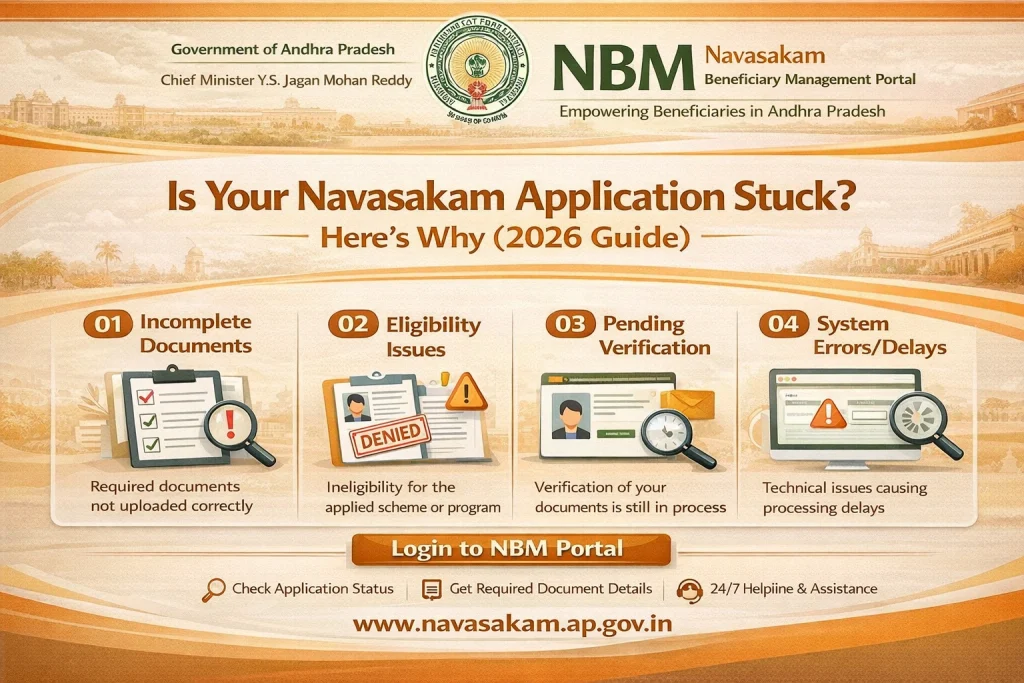
Pending Verification Due to Missing or Incorrect Documents
Why It Happens
Many applications get held up because:
Documents are unclear
File format is wrong
Important pages are missing
The portal couldn’t read the upload properly
What to Do
Log in and check your application details.
Look for any “Missing Documents” or “Needs Correction” message.
Re‑upload the required files in PDF, JPG, or PNG formats.
Make sure photos are clear, straight, and readable.
Tip: Use good lighting when scanning or photographing your documents.
Status Shows “Under Review” for a Long Time
Why It Happens
After you submit successfully, the portal sends the application for review by officials. This can take time because:
High volume of applications
Manual review of documents
Cross‑checking eligibility
If your status stays in “Under Review” for more than 10–15 business days, it might mean:
Officials are awaiting more information
There may be a verification backlog
What to Do
Check your document upload status
Use the portal’s grievance or help feature to ask for an update
Visit a Common Service Center (CSC) if you need in‑person assistance
Incorrect Personal Details
Why It Happens
If your name, date of birth, Aadhaar number, or mobile number doesn’t match your official documents, the system may stop the process.
What to Do
Correct your profile details on the portal.
Make sure your Aadhaar details are updated.
If necessary, visit a CSC to update your Aadhaar or profile details.
After correction, re‑submit your application.
Even small spelling differences can delay approval, so double‑check your input.
Login or Browser Problems May Make It Appear Stuck
Why It Happens
Sometimes it’s not the application — it’s your access:
Browser cache issues
Old versions of browsers
Portal timeouts
What to Do
Clear your browser cache and cookies
Try logging in with a different browser (Chrome, Firefox)
Try again on another device or after some time
Avoid multiple open tabs during login
Sometimes the application is processed but your view is not updated due to browser issues.
Bank or Payment Verification Delay
Why It Happens
If your application is approved but payment hasn’t arrived, it may be “stuck” in the payment processing queue. This can happen because:
Bank account verification is pending
Bank details don’t match Aadhaar
Bank server delays
What to Do
Confirm your bank account number and IFSC are correct
Make sure your Aadhaar and bank are linked
Visit your bank if needed to update details
Check back in a few days if the status shows “Approved” but no payment yet
Portal Maintenance or Technical Issues
Why It Happens
Sometimes the portal may be down for maintenance or facing delays due to high traffic.
What to Do
Try again later (morning or late evening often works)
Refresh the page a few minutes later
If the site displays a maintenance message, wait until it’s complete
Most times the issue is temporary, and your application is not truly stuck.
You Haven’t Completed All Required Steps
Why It Happens
Some schemes require multiple steps:
Eligibility check
Document upload
Final submission
If you skip a step or leave the form incomplete, the system won’t move forward.
What to Do
Go back to your Application Form
Look for any section marked “Incomplete”
Complete and submit again
You can also read: Error Fixes for Login Failed on Navasakam Portal Update 2026
Tips to Avoid Applications Getting Stuck
These habits help reduce delays and processing issues.
FAQs
Final Words
A stuck Navasakam application can feel frustrating, but most of the time it’s due to a simple issue — like missing documents, verification delays, or mismatched details. By checking your profile, ensuring clarity of uploads, and following the steps above, you can usually fix the problem yourself.
If all else fails, use the grievance feature, seek assistance at a Common Service Center (CSC), or visit your local welfare office. Staying proactive and checking your status regularly helps you move your benefits forward faster.