How to Update Income and Family Info in NBM Portal 2026
Updating your income details and family information on the NBM Portal is important. If these details are incorrect, your application might show Not Eligible, Under Field Verification, or even get rejected. The portal itself does not always allow you to directly edit these details, so you usually need to update records through official channels first and then reflect the changes in the NBM system.
Here’s a step‑by‑step guide on how to do it:
Step by Step Update Income and Family Info in NBM Portal
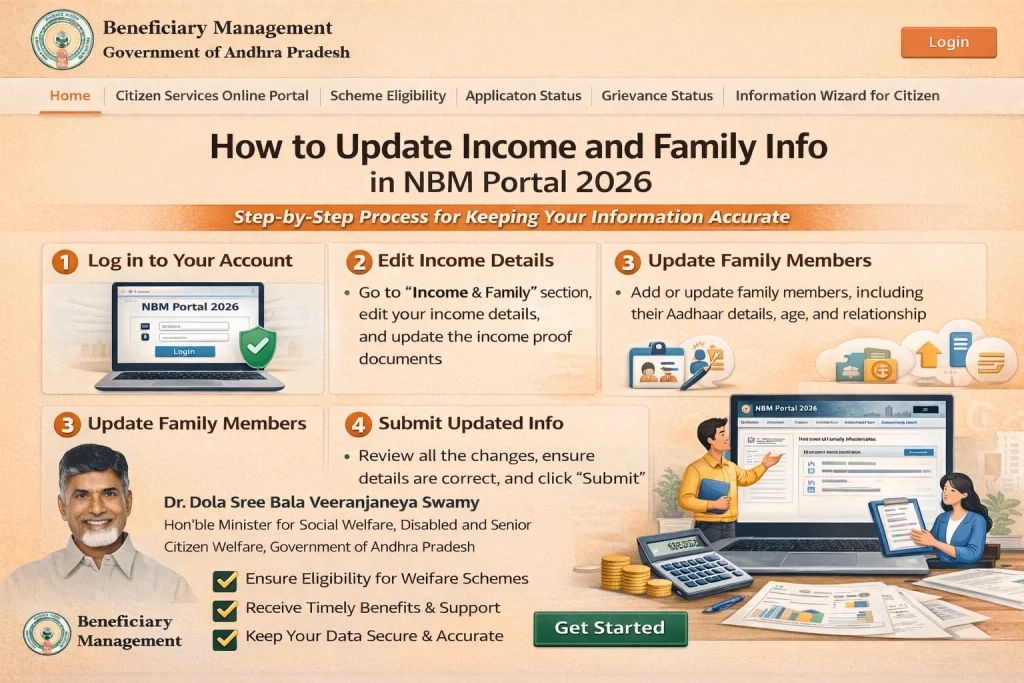
- Before you start, check your current information:
- Your income certificate
- Your family members’ names
- Relationship details (husband, wife, children)
- Your Aadhaar details (name, date of birth, address)
- Caste or residence certificates if tied to the scheme
- If any of this information is wrong in government records, the portal may show you as ineligible or delay your application.
- The NBM Portal itself does not allow direct editing of income or family information. To update your details, visit the nearest Gram Sachivalayam, village secretariat, or welfare office with:
- Your Aadhaar card
- Income certificate
- Family ID or ration card
- Any other official documents that show the correct details
- Tell the staff what needs to be updated (income details, family list, number of dependents, etc.). They will:
- Verify your documents
- Update your records in the government database
- Ensure the updated data syncs with the NBM system
- This
- Often the reason income or family data looks wrong on the NBM Portal is because Aadhaar details are not updated. If your mobile number, name spellings, or date of birth are incorrect in Aadhaar:
- Visit the nearest Aadhaar Enrollment/Update Center
- Get your details corrected first
- Once updated in Aadhaar, wait 24–48 hours for it to reflect in other systems
- After that, check the NBM Portal again.
- Once your records are updated, come back to the NBM Portal and do the Eligibility Check again. This helps the system pull the updated data and show your correct status.
- If everything matches now, you should be able to apply successfully.
- After updating and re‑checking eligibility:
- Go to Application Status
- Check if the status has moved to Pending, Approved, or Under Field Verification
- If it still shows errors, contact your local office again
You can also read: How to Avoid Application Rejections in NBM Portal 2026
What If Your Updates Don’t Show Immediately?
Government systems sometimes take time to sync. If you updated your details at a local office:
If changes still don’t show after a few days, visit the local office again and ask if the updates are fully processed.
Tips to Make Updates Smooth
FAQs
Final Words
Updating your income and family information correctly is one of the most common steps to avoid rejection or delays in the NBM Portal. The portal relies on official government databases, so the best way to fix information errors is through local offices and Aadhaar updates.
Once your records are updated and synced, a fresh eligibility check will often clear up the issue, and your application can proceed smoothly.
If you ever feel uncertain about how to update something, your local Gram Sachivalayam or welfare office is there to help guide you through the process.