How to Use Navasakam Portal with Screen Reader Tools (2026)
The YSR Navasakam portal is an official platform by the Andhra Pradesh government that allows citizens to access welfare schemes, track applications, and monitor benefits online. For people with visual impairments, navigating the portal can be challenging.
This guide explains how to use Navasakam portal with screen reader tools effectively, ensuring accessibility for all users.
Understanding Accessibility on Navasakam Portal
The portal is designed primarily for desktop and mobile users but may not be fully optimized for screen readers by default. Screen reader tools convert text on the screen into audio, making it possible for visually impaired users to navigate the site.
Popular screen reader tools include:
Using one of these tools is essential to access menus, forms, and application status updates on the portal.
You can also read: Step-by-Step Guide to Checking YSR Navasakam Benefits (2026)
Step by Step Use Navasakam Portal with Screen Reader Tools
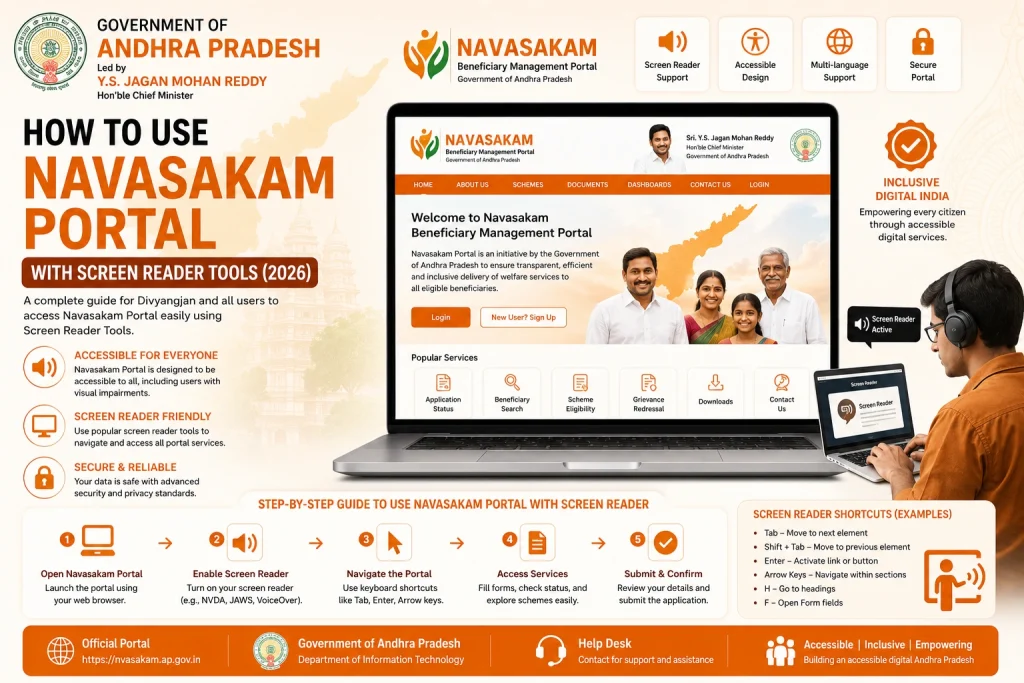
- Use a supported browser such as Chrome, Firefox, or Edge for best compatibility with screen readers
- Navigate to the official portal: gsws-nbm.ap.gov.in
- Make sure to avoid unofficial links, which may not support accessibility features.
- Launch your preferred screen reader before interacting with the portal
- Adjust settings for speech rate, volume, and verbosity according to your preference
- Use keyboard shortcuts or gestures to navigate links and menus efficiently
- Activating the screen reader before loading the portal ensures all elements are properly read aloud.
- Use the Tab key (desktop) or gestures (mobile) to move to the Aadhaar input field
- Enter your Aadhaar number
- Tab to the Get OTP button and press Enter
- Type the OTP received on your registered mobile phone
- Screen readers will announce the fields, buttons, and instructions so you can complete login independently.
- in:
- Use keyboard shortcuts to move through main sections like “My Benefits,” “Application Status,” or “Download Receipt”
- Screen readers will announce headings, links, and buttons
- You can access details of each scheme, payment status, and downloadable receipts without visually seeing the screen
- Pro tip: Learn the navigation commands for your specific screen reader to move between headings, links, and form elements faster.
- Navigate to My Benefits or Application Status
- Use the screen reader to select the desired scheme
- Listen for details such as:
- Benefit amount
- Payment status
- Disbursement date
- Application ID
- Use the Download Receipt button if needed; screen readers will confirm when the file has been saved
- This step ensures you can track all your welfare benefits independently.
- Captcha or image-based verification: Some captchas are not screen reader-friendly. If this occurs, use the audio captcha option if available or contact your local office for assistance.
- Browser compatibility: Ensure your browser is updated for smooth interaction with screen readers.
- Keyboard navigation: Avoid using a mouse; most screen readers rely on keyboard shortcuts for navigation.
- Document downloads: Confirm download location in your settings and use screen reader announcements to verify the receipt saved correctly.
- you encounter difficulties:
- Contact your local Gram Sachivalayam or MPDO office for help
- Explain that you are using a screen reader and need assistance accessing the portal or downloading receipts
- Some offices can provide printed copies or audio guidance for accessibility
- Support from local offices ensures that accessibility challenges do not prevent you from using government services.
Tips for Smooth Accessibility
FAQs
Final Words
Using the YSR Navasakam portal with a screen reader is possible with proper tools and guidance. Activate your screen reader, follow keyboard navigation, and ensure you use the official portal for best results.
By following this guide, visually impaired users can check benefits, download receipts, and track application status independently, making government welfare services accessible to everyone.